
From Fragile Excel Quoting To Reliable Deals in Zoho CRM
When one wrong number can quietly cost a fortune
A fast‑growing B2B software company in the media and entertainment industry sells a specialist middleware product that manages large media archives for broadcasters, post‑production houses, live sports organisations and national archives.
The company works almost entirely through a global network of 40–60 resellers and system integrators, with deal sizes typically between 45,000 and 200,000 and sales cycles of 9–12 months. In this context, one wrong number on a quote can quietly cost a small fortune.
The challenge: one risky Excel file running all quotes
All pricing and quoting ran through a single Excel workbook maintained by the founder.
This spreadsheet handled, in one place:
Perpetual license pricing across multiple product components
Tiered partner discounts
Annual support as a percentage of license value, with services intended to be excluded
Currency conversion between USD and EUR at a fixed rate
Over time, hidden formulas, side calculations and manual overrides turned the file into a fragile, high‑risk asset. A past mistake where monthly and annual values were confused nearly caused a four‑figure loss in commission on a major deal—exactly the kind of “one wrong number costing a fortune” scenario the business wanted to eliminate.
On top of that:
Quotes were rebuilt manually in Word with narrative, architecture diagrams and pricing tables, entirely outside the CRM.
HubSpot CRM tracked deals, but there was no system link between deals, quotes, purchase orders, invoices or renewals.
Only the founder fully understood the pricing model, limiting throughput to around 6–7 quotes per month and creating a key‑person bottleneck.
A single risky spreadsheet and manual document work were capping growth and exposing the business to avoidable errors.
Objectives: de‑risk quoting and prepare for scale
The company wanted to:
Get critical pricing logic out of Excel and into a governed system where formulas cannot be accidentally broken.
Make it much harder for a mis‑typed value or overwritten formula to quietly destroy margin on a big deal.
Reduce key‑person dependency so other team members could safely create quotes within clear rules.
Maintain strong oversight: no quote should reach a customer without the founder’s approval.
Keep Phase 1 focused: only perpetual license and support quoting would move into Zoho; OPEX subscription logic would be added in a later phase.
Zoho CRM was chosen as the core platform, with a lean CPQ‑style setup built directly into standard modules.
Approach: rebuilding the Excel model inside Zoho CRM
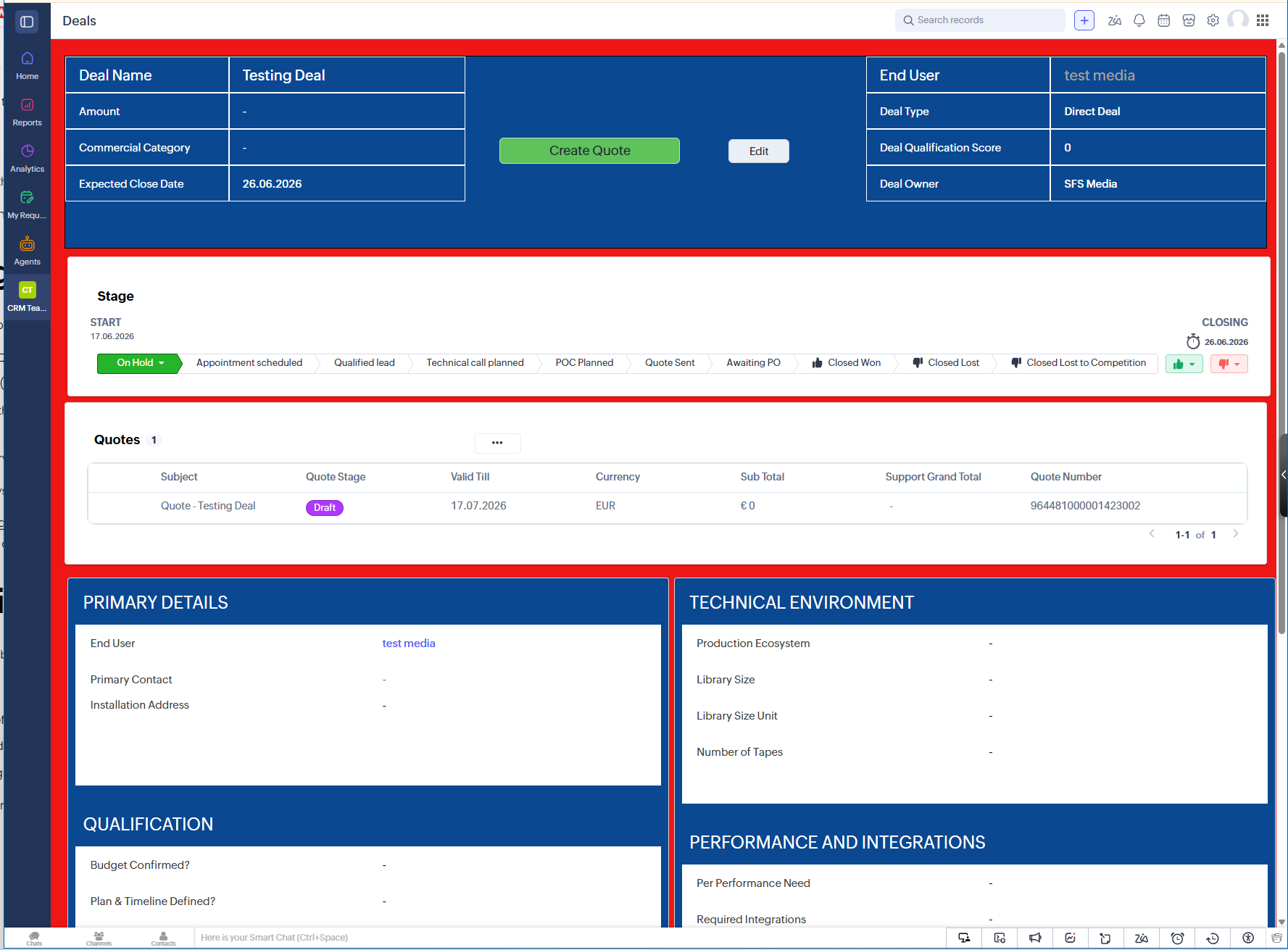
An external Zoho consultant started with a process audit and then implemented a minimal, deal‑centric configuration in Zoho CRM designed specifically to replace the risky spreadsheet.
1. CRM design: simple structure, one main working hub
To keep adoption easy and limit maintenance, the configuration used standard Zoho CRM modules only:
Accounts & Contacts
Kept deliberately light, storing essential company and contact details.
No heavy qualification or technical fields; those live on Deals.
Deals as the main working screen
Sales users open a Deal to see who the customer and partner are, what stage the deal is at, basic project size, and a concise technical and commercial summary.
The company’s four Yes/No qualification questions (need, plan/timeline, budget, decision‑maker) are embedded as fields, with an automatic score to support prioritisation and forecasting.
Products & Quotes for all pricing logic
Products represent all license SKUs and professional services, with clear fields indicating whether each product is support‑eligible.
Quotes replace the Excel sheet as the only place where license prices, discounts and support are calculated.
This structure lets users stay mostly on the Deal and Quote screens, instead of jumping across multiple modules and offline documents.
2. Product catalogue: turning spreadsheet lines into structured products
The first technical step was to translate the Excel line items into a clean product catalogue:
Every license and service in the spreadsheet became a Zoho Product with a stable code, list price and category (e.g. Core System, Data Mover, Integration, Professional Service).
A simple flag marks whether each product should be included in support calculations (licenses) or excluded (services).
Instead of one giant sheet with repeated lines and fragile formulas, there is now a central list of products with clear behaviour that Zoho uses when building quotes.
3. Encoding the core Excel formulas in Quotes
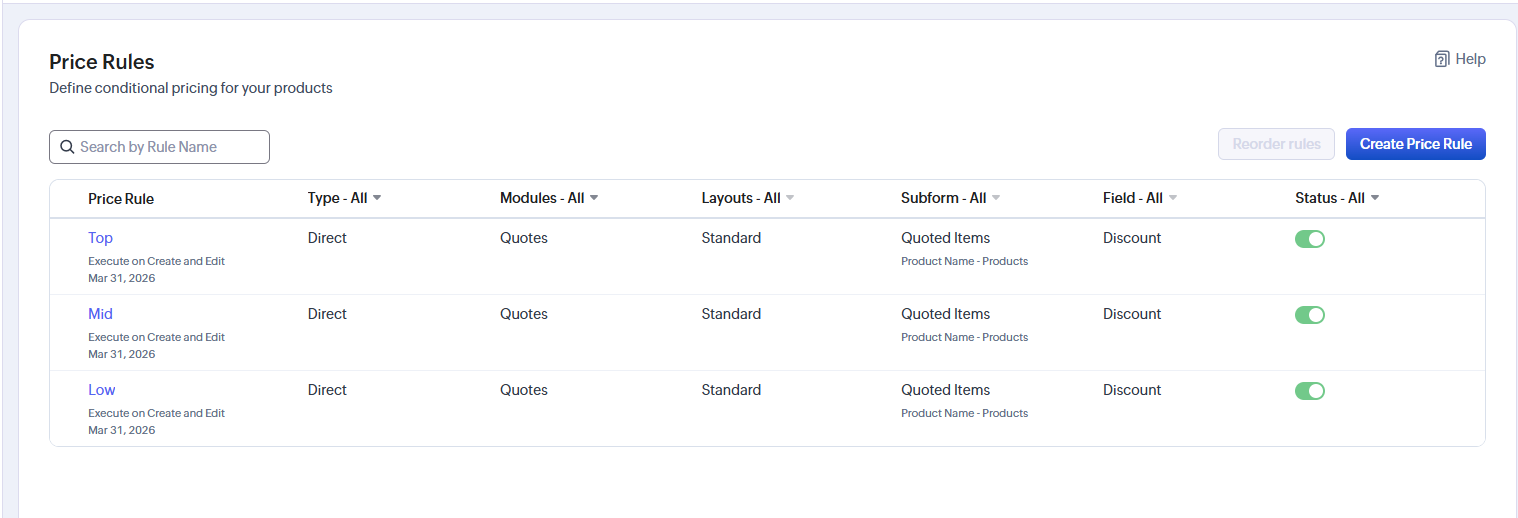
The heart of the project was to move the perpetual license and support logic into Zoho’s Quote module, making the rules visible and hard to break:
Users add Products to a Quote as line items and can apply controlled discounts, replacing “type a percentage into Excel” with structured fields.
The support percentage (for example, 22%) is captured on the Quote, not buried in a hidden cell.
Formula fields calculate the support amount automatically as the chosen percentage of the sum of support‑eligible license lines only, ensuring services do not inflate support by accident.
Total values (licenses, services, support) are calculated consistently every time, following the same logic the founder previously applied in Excel—but now fully transparent.
By encoding the rules in the system rather than in one person’s memory, the chance that a stray edit “costs a fortune” is substantially reduced.
Crucially, OPEX subscription logic and term‑based monthly fee calculations were kept deliberately out of scope for Phase 1, to keep complexity low and focus on making the existing perpetual model safe and scalable.
4. Introducing a clear approval process
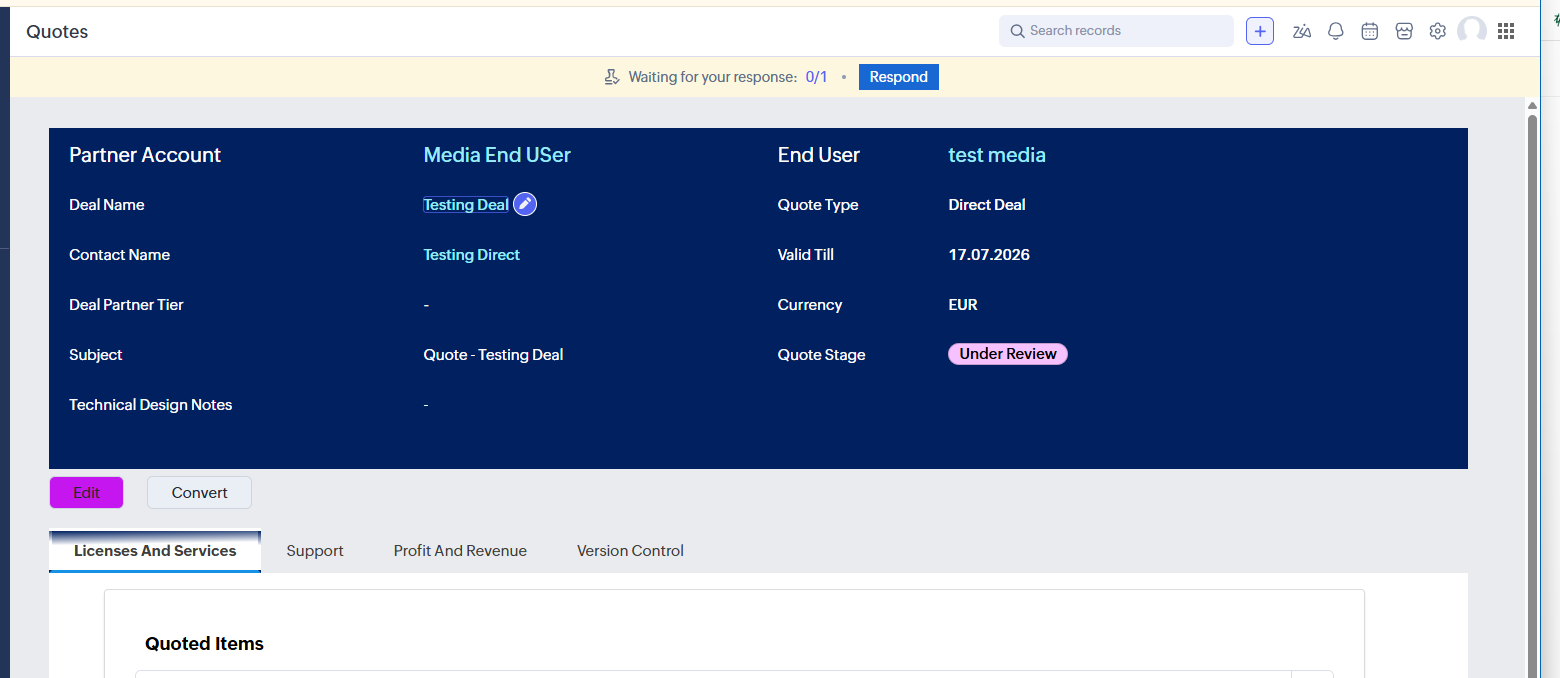
Previously, any quote created by someone else had to be emailed to the founder as an Excel/Word attachment and checked manually.
In Zoho CRM:
Quotes move through defined statuses such as Draft, Submitted for Approval, Approved, Rejected and Sent.
The founder is configured as the final approver on all quotes, with the ability to adjust configuration, discounts and support settings before approval.
Instead of hunting through files and emails, the founder can simply log into Zoho, filter for quotes awaiting approval, and review them directly in the system.
This keeps the necessary control but removes the friction and risk of email‑based approvals and offline files.
Outcomes: less risk, more capacity, and no more “one‑formula disasters”
Even before later phases (invoicing, renewals, OPEX), the impact of moving off Excel was clear.
1. Dramatically reduced risk from quoting errors
Pricing logic for perpetual licenses and support now lives in Zoho CRM in governed fields and formulas, not in a fragile spreadsheet. Rules like “services do not affect support” are enforced by the system instead of by memory, reducing the chance that one wrong number quietly wipes out margin on a six‑figure deal.
2. Increased quoting capacity without extra headcount
By structuring products and automating calculations, the system is designed to support an increase from roughly 6–7 quotes per month towards the target of around 20, without requiring the founder to personally build every quote in Excel and Word.
3. Reduced key‑person dependency
Because the pricing model is now encoded in Zoho CRM, other team members can create quotes within clear guardrails, while the founder focuses on reviewing and approving rather than doing all the calculations manually.
4. A safe foundation for future automation
Deals, technical context, pricing and quote status now live in one system, ready for future phases such as quote‑to‑invoice automation and recurring support and OPEX renewals—all without returning to risky spreadsheets.
Ready to retire your “scary” Excel quote sheet?
If your quoting still lives in one complex spreadsheet—where a hidden formula or mistyped cell can quietly cost you a fortune—it’s a sign your business has outgrown Excel.
This project shows that you do not need a heavyweight enterprise system to fix it. A focused Zoho CRM build can:
Keep your existing pricing model, but make it safe and transparent
Get quoting out of Excel and into a shared system your team can actually use
Let you keep final approval, without personally rebuilding every quote
If that sounds familiar, the next step is simple:
Click the button below to book a free consultation, and we’ll look at your current quote spreadsheet together and map out how to de‑risk it.
What part of your current spreadsheet worries you most—the discounts, the support % calculations, or keeping formulas from being overwritten?