
Case Study: Standardising Health and Safety Documents with Zoho CRM and AI
Many service businesses live inside Word documents and email threads. Keeping on top of proposals, client agreements and project information with copy‑and‑paste alone soon becomes slow and fragile. This case study shows how a UK consultancy moved from Google Forms and Google Docs to a more robust setup using Zoho CRM and AI — and how they did it without needing deep technical skills.
A UK-based health and safety consultancy replaced a slow, fragile document process with a more structured system built around Zoho CRM, Zoho Forms, Zoho Flow, Zoho MCP and Perplexity. The result was a simpler way to store project information once, reuse it across multiple documents, and reduce the time spent producing both standard and more complex health and safety paperwork.
Background
Before the project began, the consultancy relied heavily on Google Forms and Google Docs for document generation, supported by an older process that had become difficult to adapt over time. Information such as company details, project contacts and recurring consultant relationships often had to be typed in again for each new project, even when the same organisations were involved repeatedly.
This was especially frustrating for longer documents such as pre-construction information packs, where updated project details had to be inserted manually as more information became available. Small changes to the legacy process often created instability or delays, making the whole system cumbersome, slow and increasingly hard to maintain.
Objectives
The first goal was to create one central place for project data, contacts and related companies so information could be entered once and reused across the full document cycle. The second was to replace dated templates with clearer, more modern documents that better reflected the consultancy’s current way of working.
A further objective was to streamline the process as much as possible without making it harder for staff to use. AI was introduced selectively, not everywhere, but where it offered a clear benefit for longer or more complicated documents that required structured text output rather than simple field replacement.
Solution design
Zoho CRM became the central project hub. Leads are not currently used in this part of the system, although they may be introduced in a later phase as the wider CRM setup develops. Accounts are used to store the companies involved in a project, which may include end clients, architects, designers, engineers and other organisations. Each account can hold multiple contacts, making it much easier to reuse existing relationship data instead of re-entering it for every job.
All new work begins in the Deal module, where fee proposals are generated using Zoho Mail Merge and electronic signatures are captured through Send and Sign. The Deal record sits inside a blueprint, which guides the user through the information needed to quote the work in a consistent way. Once a project is accepted, the system creates a detailed Project Record in a custom module, giving the business a richer operational record than the original quotation stage alone.
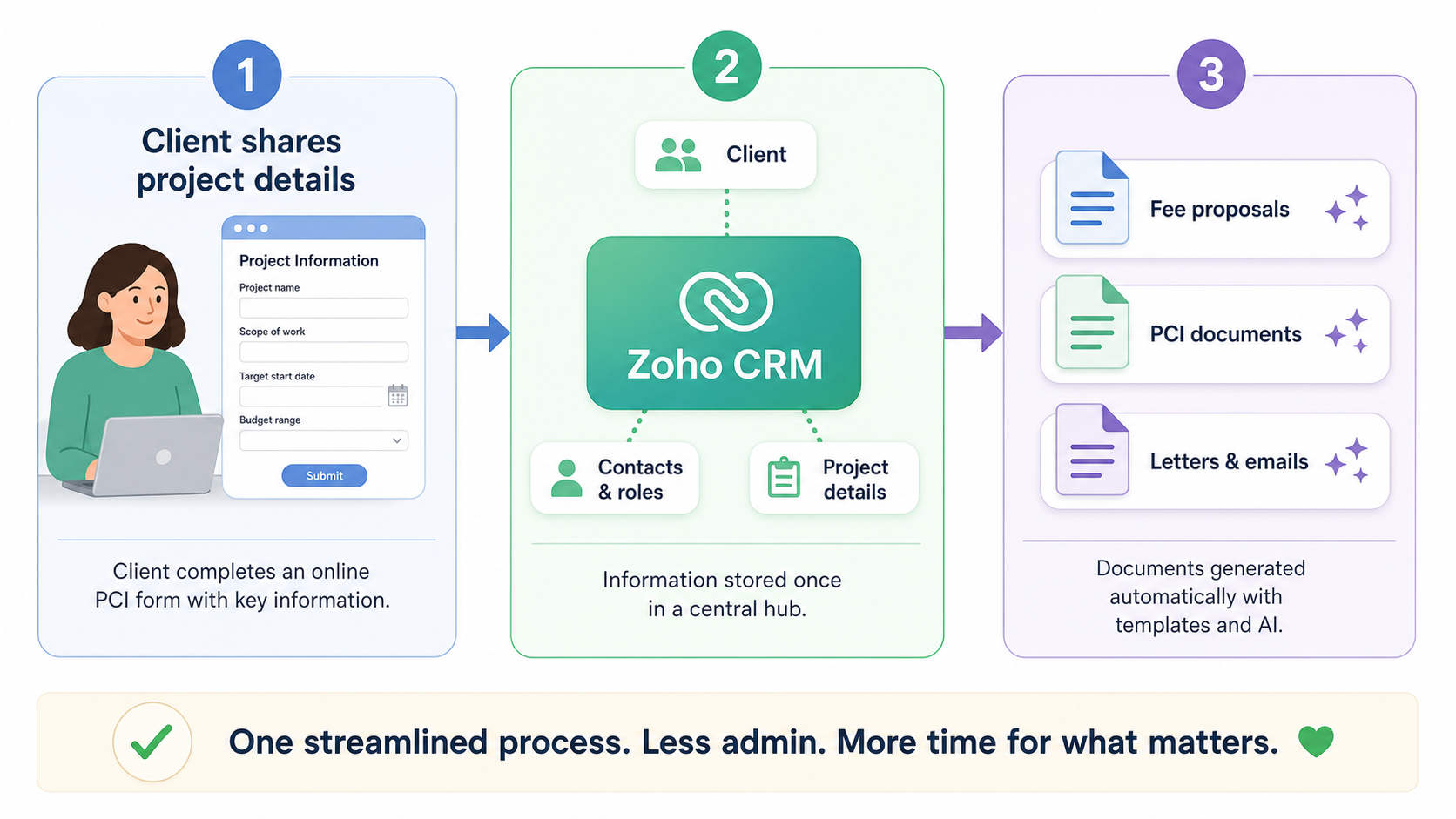
That Project Record contains detailed information gathered from the client, including data provided through a dedicated PCI form. A separate Projects Directory module stores the contacts associated with each project and the role each person plays, which supports document requirements where named duty holders and project participants need to be clearly identified.
From that point, there are two document routes. For straightforward documents where only a few fields change, such as address, date or client details, the system uses standard Zoho Mail Merge followed by Merge and Send. For more complex documents that need reasoning and longer text generation, the setup uses Zoho MCP with Perplexity to produce a first draft based on CRM data and the required health and safety context.
AI-supported documents
The more advanced part of the solution involved configuring Zoho MCP so it could read the relevant CRM data held in the Project Record. Connections were then set up in Perplexity so the two systems could work together, allowing the document workflow to combine structured CRM data with guided AI drafting.
A computer skill was then built around a template document supplied by the client, along with instructions on how the draft should be structured and written. This made it possible to generate longer, more detailed documents in a format that followed the client’s preferred layout and could still be edited afterwards. The resulting draft can either be refined through further prompts in Perplexity or downloaded as a Word document for manual editing before it is shared with the end client.
Used in this way, AI was not treated as a replacement for expertise. Instead, it was used as a practical drafting assistant for complex documents such as pre-construction information, where the same structure is repeated often but the content still needs to reflect the live details of an individual project.
Implementation
Implementation was deliberately gradual. The work started by putting the core CRM structure in place so the business had a solid foundation rather than trying to automate everything at once. From there, the rollout moved one document at a time, beginning with the most frequently used fee proposal template.
The next step was the PCI request document. Instead of keeping this as a Word file, it was rebuilt as a Zoho Form, making it easier for the client to complete and far easier for the consultancy to capture structured responses. The end client now receives an email template from the CRM project record containing a button that links directly to the PCI form, and the submitted data flows back into the CRM through integration and Zoho Flow.
After that, additional basic documents were implemented as mail merge templates within Zoho CRM wherever the content was mostly standard and only key fields changed between projects. Once the client had become more comfortable with the new way of working, the implementation moved on to the more complex AI-assisted documents. Rollout and training are still ongoing, which reflects the practical reality of introducing a new system inside a busy consultancy.
Results
The biggest improvement has been the move from scattered document preparation to a single, more reliable source of project information. Instead of repeatedly typing the same company names, contacts and project details into multiple documents, staff can now capture that information once and reuse it across the process.
This has also improved consistency. Standard documents now follow a clearer structure, use modern templates and are generated in a more repeatable way, which reduces manual errors and makes outputs look more professional. For more complex paperwork, the combination of Zoho MCP and Perplexity has reduced drafting time while still leaving room for human review and editing before documents are issued.
Another important gain is that the system is easier to build on than the legacy Google-based setup. What was once unstable and difficult to change is now a structured platform that can support further automation, broader CRM use and more joined-up project administration over time.
What this means for other businesses
For non-technical business owners, the main lesson is that this kind of project does not need to start with a large, fully automated system all at once. A better approach is often to begin with the most repetitive documents, create a dependable structure for project data, and then add automation in stages as the team becomes comfortable with the process.
It also shows that AI works best when used with clear boundaries. For simple documents, normal template automation is often enough. For longer or more complicated documents, AI becomes more useful when it is connected to trusted business data, given a clear template to follow, and used to create a draft that staff can review and refine.
If this sounds familiar and you’d like to explore a similar approach for your own business — starting small and focusing on your most repetitive documents — feel free to get in touch. We can look at your current process and see whether Zoho CRM and AI‑supported documents would make a meaningful difference for you.