
When a business packs and ships its own orders, the paperwork usually sorts itself out. Someone prints the invoice, tapes the shipping label to the box and hands it to the courier. Things change when packing moves to a warehouse, a repair partner or a fulfilment company. Now the people holding the box are not the people who produced the documents, and the gap between them is where shipments go wrong. I'm currently working on exactly this with an equipment business whose orders are packed and dispatched by an outside partner. This article explains the problem, the approach we're testing and what other businesses can take from it.
The problem: the box is ready, the documents aren't
On paper, the process looked simple:
- The order is confirmed.
- The partner picks and packs it.
- The office books a courier and sends the invoice and shipping documents.
- The partner attaches the documents and hands the parcel over. In practice, steps 3 and 4 were loosely connected. The system recorded that the order was packed and that a courier had been booked, but nothing confirmed that the invoice and air waybill had actually reached the partner and been attached to the parcel. A record could move to "ready to ship" because one step had happened, even though another hadn't. For international shipments that matters. A parcel without the right invoice can sit in customs, and the customer usually blames the supplier, not the courier.
The approach: make the paperwork a gate, not a reminder
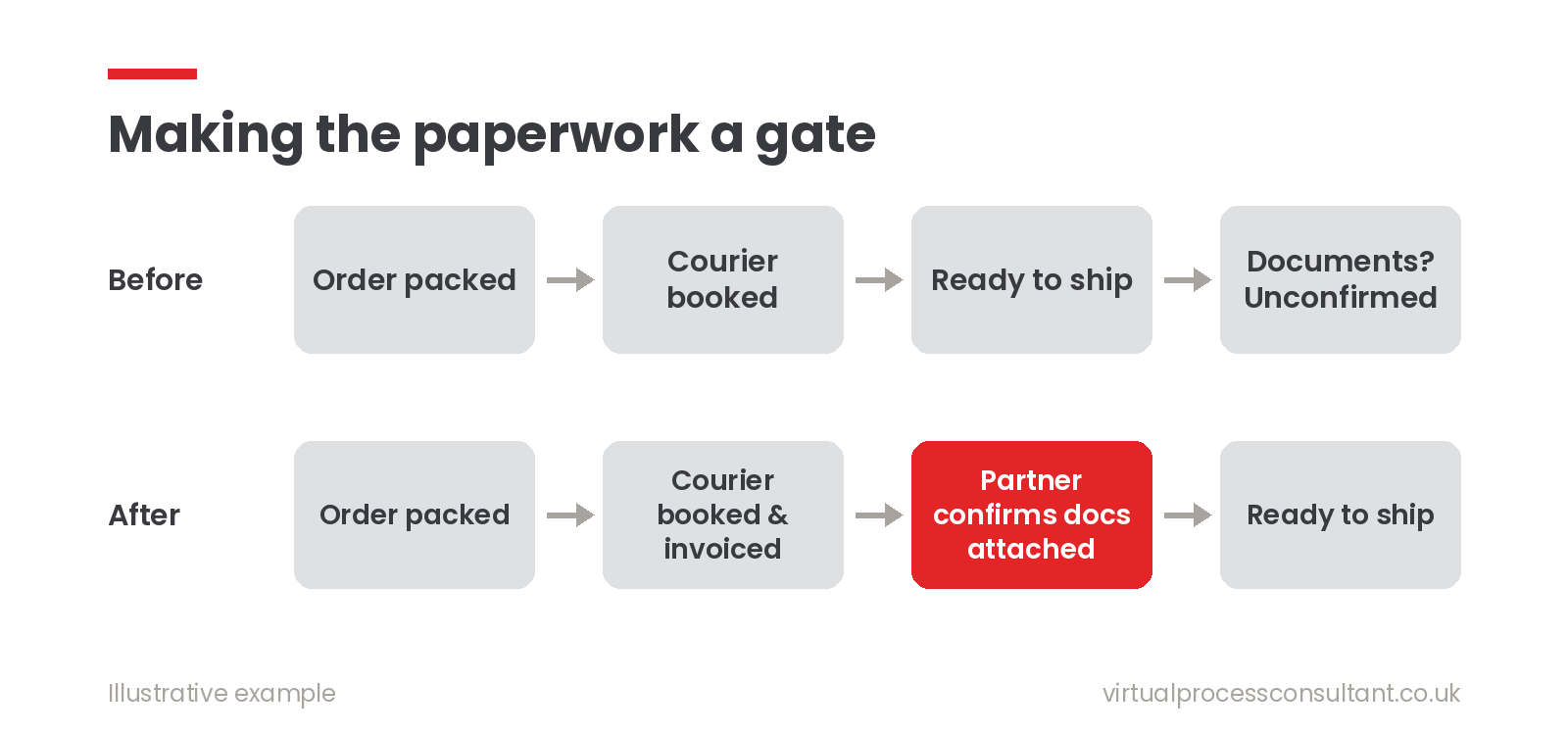
The tempting fix is a reminder: an email or task that says "don't forget the documents". Reminders help, but they rely on someone noticing them at the right moment. Instead, we're making the documents a gate. The order cannot move to the next stage until a specific person has confirmed a specific thing. In Zoho CRM, the order follows a Blueprint, which is a set of stages with rules about how a record may move between them. Courier booking and invoicing land the order on a stage we call Invoiced. That is deliberately not the end of the road. The only way out of Invoiced towards Ready to Ship is a confirmation from the partner. That confirmation happens in the partner's own portal, built in Zoho Creator. When they have the invoice and air waybill attached to the parcel, they click a single action: Docs attached to parcel. That action, not someone in the office, moves the order on in CRM. The office remains responsible for producing the documents. The partner is responsible for confirming they're on the parcel. Each confirmation sits with the person who can actually see the evidence.
Two details that made a difference
Every route has to pass through the gate. Orders could reach the courier stage in two ways: on credit, where the invoice is created at that point, or prepaid, where the invoice already exists. In testing, the prepaid route skipped Invoiced and jumped straight to Ready to Ship, quietly bypassing the check. The fix was simple once found: both routes now land on Invoiced. If your process has more than one path, test each one against the gate. The rule is only as strong as its weakest route. Multi-box orders need checking as a whole. Some orders go out in several boxes. An early version looked only at the box someone had selected, so an order could look incomplete or complete depending on which box was clicked. The process now considers every open box on the order before it moves anything on.
What we deliberately didn't build
We could have added automatic checks on the attachments themselves, such as reading file names or counting PDFs. We decided against it for now. A clear human confirmation from the person holding the parcel is simpler, easier to explain and easier to trust than a clever rule that can be fooled by a badly named file. If the confirmation proves unreliable in practice, that's the point to add more automation, not before. This work is still in testing, so I'll share how it performs once it's live.
What to take from this for your business
If someone else handles part of your fulfilment, ask yourself three questions:
- Which documents must travel with the goods? Invoices, delivery notes, certificates, customs paperwork. Write the list down.
- Who can actually see that they're there? That person, not the person who produced them, should confirm it.
- Can your system move an order forward without that confirmation? If yes, by any route, there's a gap. You don't need a large system to close that gap. Often it's one stage, one button and one rule about who presses it.
Need a hand with your dispatch process?
If orders, documents and partners are being held together by email in your business, that handover is usually the first thing worth fixing. Book a free 30-minute introduction and we'll look at it together, or see how I approach workflow automation. Related reading: Industrial Spares Automation with Zoho CRM, Books & Inventory