
If your business repairs, services or installs equipment, two questions come up on every job:
- What did we use?
- What should the customer pay for? They sound like the same question. In practice they're different, and a lot of admin pain comes from trying to answer both with one record. I'm currently working through exactly this with an equipment business that repairs units through an outside repair partner. This article explains the problem and the approach we've taken, and what to consider if your business has the same tension.
Where it goes wrong
The usual starting point is simple: whoever does the job lists the parts on the job sheet, and those lines go on the invoice. That works until one of these happens:
- Some parts are included in the price. A standard repair might always use the same kit of seals, filters or consumables, already built into the labour charge. If every part goes on the invoice, the customer is charged twice. If you leave them off the job record, your stock figures drift.
- Some parts are extra. Anything beyond the standard kit should be charged, at the right price.
- Stock still has to add up. Whether a part is charged or not, it has left the shelf. If it isn't recorded, stock counts stop matching reality, and nobody notices until a reorder is missed. When stock and billing share one list, every job becomes a judgement call about what to include. Different people make different calls, and the numbers stop matching.
The approach: two records, one rule between them
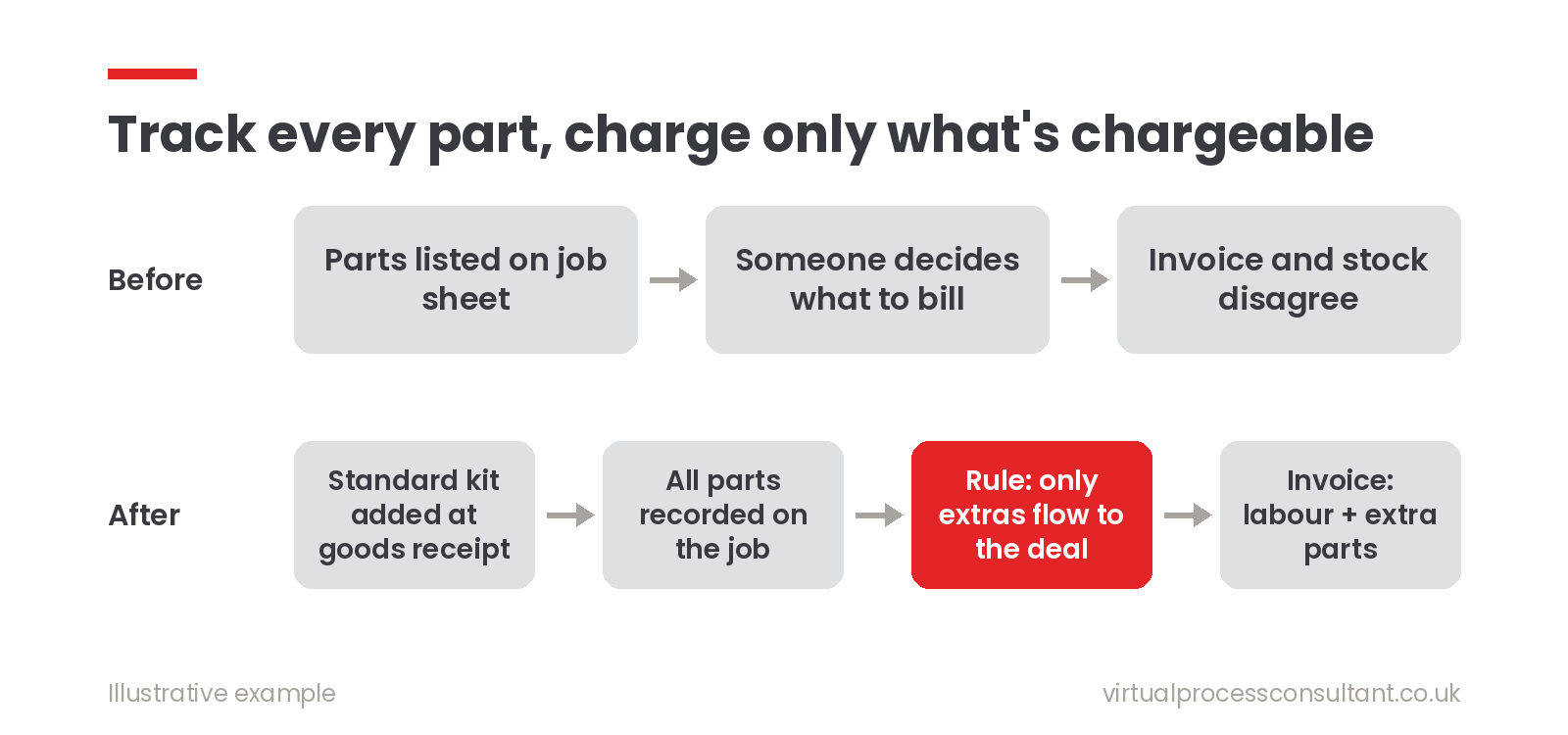
Instead of one list, we keep two, with a clear rule connecting them. The job record tracks everything physical. In the repair application, built in Zoho Creator, every part used on a job is recorded, whether it's charged or not. That's what keeps stock reconciliation honest. The sales record carries only what's chargeable. In Zoho CRM, the repair deal holds a labour line for each unit, plus any additional parts that fall outside the standard kit. Those extra parts are priced from the product's unit price in CRM, so the price list lives in one place. The rule decides what crosses over. Standard kit quantities stay on the job record only. Anything above the included quantity, or any part outside the kit, flows across to the deal automatically. Nobody has to decide line by line what's billable.
A detail that saves the most time
The standard kit is added automatically when the goods are received and the unit type is known. Each unit type has its own kit, so the system already knows which parts a standard repair will use. That means the repair partner doesn't key in the same handful of standard parts on every job. They only record what's different, which is exactly the information the office needs for billing.
What we deliberately kept separate
It was tempting to push everything into CRM, so that one system held both stock and sales. We decided against it. The repair partner works in the Creator portal, which is where the physical work is recorded, and CRM is where commercial decisions are made. Keeping each record in the system its users actually work in made the rules simpler and the data easier to trust. Parts are also left off the purchase order to the repair partner. They remain the business's own stock, so the partner's order covers only labour and packing. This work is part of an ongoing project, and parts of it are still being tested.
What to take from this for your business
If you sell a service that uses physical parts, ask:
- Do some parts come "included"? If so, write down the standard kit for each job type.
- Where do you count stock, and where do you raise invoices? If it's the same list, expect drift.
- Who decides what's chargeable? If the answer is "whoever fills in the job sheet", turn that decision into a rule the system applies. You don't need a large system to fix this. Often it's a clear definition of what's included, and an automatic rule for everything else.
Need a hand with this?
If your team is re-checking job sheets before every invoice, that's usually a sign the rule belongs in the system rather than in someone's head.
Book a free 30-minute introduction and we'll look at it together, or see how I build custom Zoho Creator applications.
Related reading: Industrial Spares Automation with Zoho CRM, Books & Inventory