
Plenty of small and medium-sized businesses run their stock in Zoho Inventory and their accounts in Xero. The standard integration, built by Zoho, connects the two in a few clicks, and for invoices and bills it works well.
The trouble is what it doesn't do. Most businesses find out after go-live, usually when a VAT return is due or the accountant asks why Xero doesn't match the warehouse. I'm working through this with an equipment business at the moment, and the same gaps keep coming up.
Here are the gaps worth knowing about before you rely on the sync, and how to fill each one.
First, what the integration does
According to Zoho's Xero integration guide, Zoho Inventory sends invoices, payments received, credit notes, bills, vendor credits and, optionally, stock journals to Xero. It brings your chart of accounts and customers back from Xero. Almost everything travels in one direction: from Inventory into Xero.
That one-way design causes most of the gaps.
Gap 1: Payments recorded in Xero don't come back
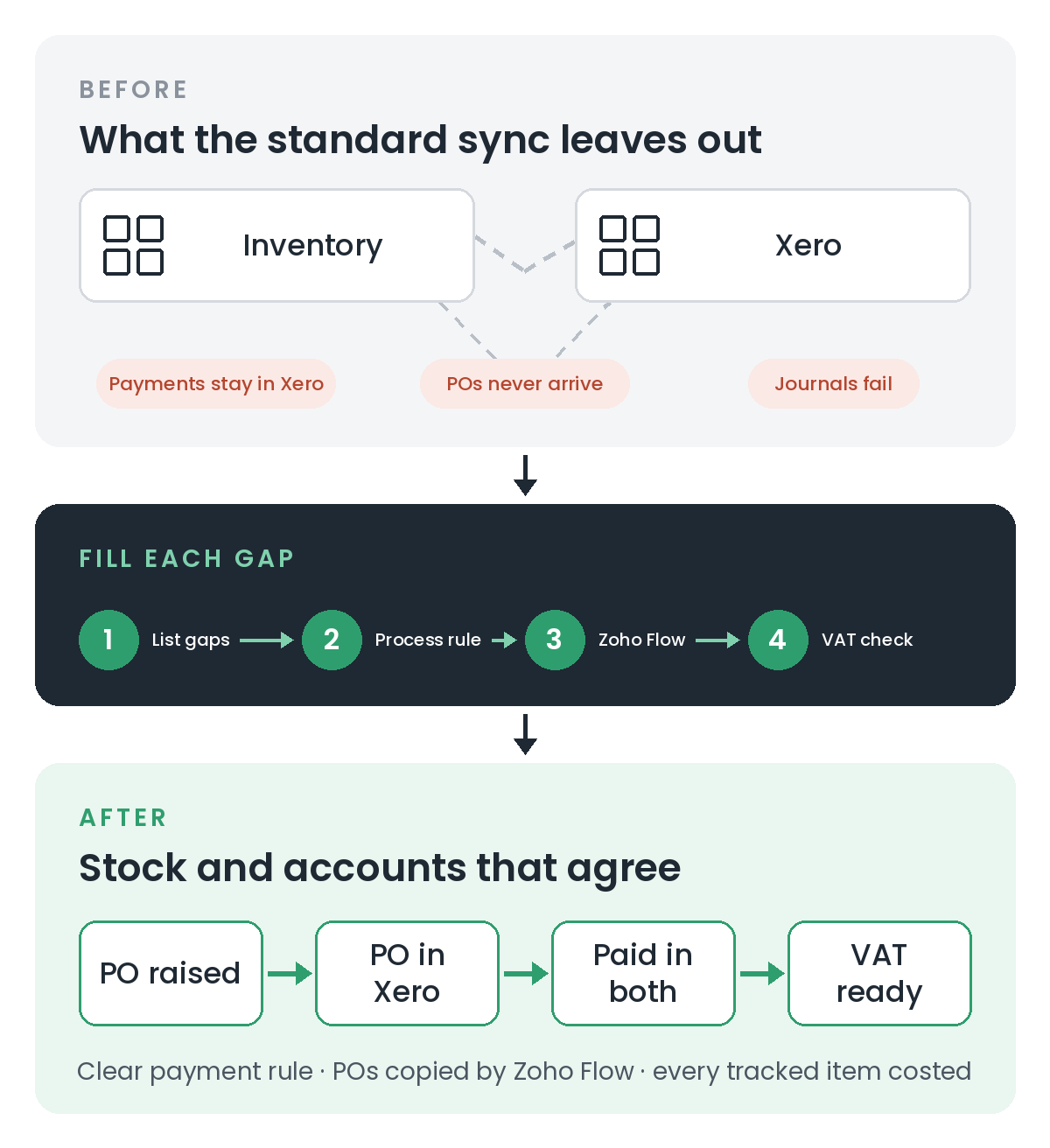
Zoho's sync table lists invoice payments as a one-way sync from Inventory to Xero. If your bookkeeper reconciles the bank in Xero and records customer payments there, Zoho Inventory never hears about it. The invoice still looks unpaid in Inventory, so statements, credit control and any "paid before we ship" rule are working from the wrong information.
How to fill it: the simplest fix is a process one. Record customer payments in Zoho Inventory, let them flow to Xero, and have the bookkeeper match the bank line to the payment that's already there. If payments really must start in Xero, Zoho Flow can listen for Xero's "Payment created or updated" trigger and use Zoho Inventory's "Record customer payment" action (Zoho Flow's Xero and Zoho Inventory connectors). Test this carefully, because a payment recorded in Inventory is itself exported to Xero, and you don't want it arriving twice.
Gap 2: Purchase orders never reach Xero
The integration sends bills, not purchase orders. So Xero only learns about a purchase when the supplier's bill is entered, not when you commit to it. That can matter if your accountant wants to see committed spend, or if someone in finance prefers to receipt purchases in Xero.
On my current project, the finance lead asked for exactly that: receipt purchase orders in Xero, but keep stock updated in Inventory.
How to fill it: Zoho Flow has a Zoho Inventory "Purchase order created" trigger and a Xero "Create or update purchase order" action. That's enough to copy each purchase order across as it's raised, with a "Purchase receive created" trigger available if you want to act when goods arrive. One technical detail that catches people out: map the purchase order lines in the Xero action's Line Items section, using bulk mapping. Inserting a single line-item variable only ever picks up one row.
Gap 3: Sales accounts follow the item, not the customer
When you set up an item in Zoho Inventory, you choose which Xero account its sales go to. That's the only place the choice is made. If your accountant wants sales posted to different accounts depending on where the customer is (UK, EU and the rest of the world, for example), the standard integration can't do it. We hit this on the same project.
How to fill it: there are three realistic options, and the right one depends on how many invoices you raise.
- Separate items per market. Simple, but it clutters your item list and relies on people picking the right one.
- A periodic reallocation in Xero. Run a sales-by-customer-country report from Inventory each month and post one journal. This is cheap, and accountants are used to it.
- A custom integration that posts invoices through the Xero API with the right account code. It's the most accurate option and the most work, and it means replacing the standard invoice sync for those invoices.
Gap 4: Stock journals need a cost on every tracked item
If you switch on journal sync, Inventory sends entries that update the Inventory Asset and Cost of Goods Sold accounts in Xero. To do that, every stock-tracked item needs a cost.
Items you make yourself are often set up with purchase information switched off, because there's no supplier. Inventory then has nothing to value them at. The journal fails, and a stream of failure notifications appears. In our case that made it hard to tell whether the invoices themselves had reached Xero.
How to fill it: give every tracked item a standard cost, even if it's an estimate agreed with your accountant. If Xero doesn't actually rely on Inventory for stock valuation, consider switching journal export off and posting stock value in Xero on a schedule your accountant is happy with. Either way, separate the two questions. A failed journal is not the same as a missing invoice, so check invoices on their own before each VAT return.
Gap 5: Draft invoices are exported too
Zoho's guide says that invoices in Draft status are exported to Xero as well. If your team uses drafts as placeholders or quotes, they can end up in Xero looking like real sales.
How to fill it: don't use draft invoices as placeholders. Use sales orders or quotes instead. Then add a check for draft invoices in Xero to your month-end list. When you first connect, set the "Export Data From" date carefully, so older history doesn't flood in.
Gap 6: Line discounts become one total discount
Xero doesn't support line-level discounts on synced invoices, so Inventory adds them up and shows a single total discount. If you analyse discounts by product, that detail is lost in Xero.
How to fill it: if product-level discount reporting matters, put the discounted price on the line itself (price lists help here) rather than using the discount field. Otherwise, report on discounts from Inventory, not Xero.
Gap 7: Items, customers and organisations have limits
A few smaller limits are worth knowing about at the planning stage:
- Items: only items used on a synced transaction are created in Xero, and existing Xero items aren't imported. Zoho's advice is to export them from Xero, import them into Inventory, and mark the Xero originals inactive.
- Customers: new customers come across from Xero once a day unless someone syncs manually. Decide where customers are created, and stick to it.
- Organisations: you can connect one Xero organisation to one Inventory organisation, and both must share the same country and base currency. Groups with several companies need a plan for each one.
What to take from this
The standard integration is a good starting point. It just isn't a complete one. Before you rely on it, sit down with whoever does your books and run through this list:
- Where are customer payments recorded, and does the other system need to know?
- Does finance need to see purchase orders in Xero, or only bills?
- Do sales need posting to different accounts by customer type or country?
- Does every stock-tracked item have a cost?
- Do we ever use draft invoices as placeholders?
Every "yes, but…" is a gap. Most can be filled with a clear process rule or a small Zoho Flow. A few need custom work. The point is to know which before your first VAT return, not after it.
This is part of an ongoing project, and some of these fixes are still being put in place.
Need a hand?
If your stock system and your accounts never quite agree, I can help you work out which gaps matter for your business and fill them properly. Book a free 30-minute introduction, or see how I approach workflow automation.
Related reading: Your Stock Records and Your Invoices Answer Different Questions