
Most automations are tested once: press the button, check the result, tick it off. But in real use they run again. A workflow fires on a second edit. Someone clicks "Process order" twice because nothing seemed to happen. A function fails halfway, someone fixes the cause and runs it again.
If that automation only sends an email, a second run is a minor annoyance. If it creates sales orders, invoices or stock movements, a second run means two orders for one deal, doubled quote lines, or an invoice for something that has already been invoiced. Developers call the fix making it "idempotent": running it again gives the same result as running it once.
It's one of the least visible parts of a Zoho build, and one of the most valuable. These are the rules I build in, drawn from an order process for an equipment supplier with a spares operation and a partner portal for a technology reseller.
Why do automations run more than once?
Usually because of how they're triggered, not because the code is wrong. In Zoho CRM, a workflow rule set to "Repeat this workflow every time a record is edited" runs on every edit while its criteria are still met. Zoho's own troubleshooting guide lists "workflow getting triggered multiple times" and points to this setting first (Zoho CRM help). Add buttons that people can press more than once, scheduled syncs that overlap with instant ones, and re-runs after a failure, and a second run is close to certain.
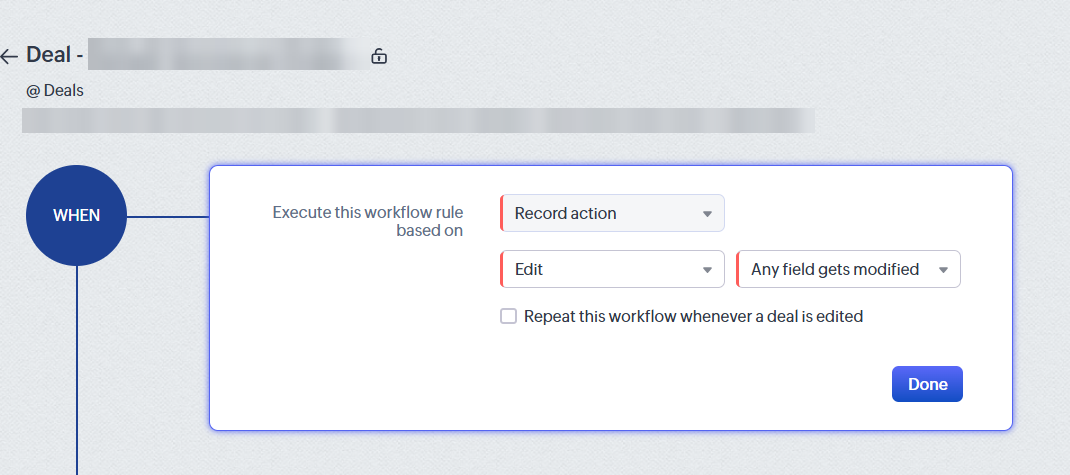
This one checkbox decides whether a workflow runs once or on every edit.
So the question isn't whether it will run twice, but what happens when it does.
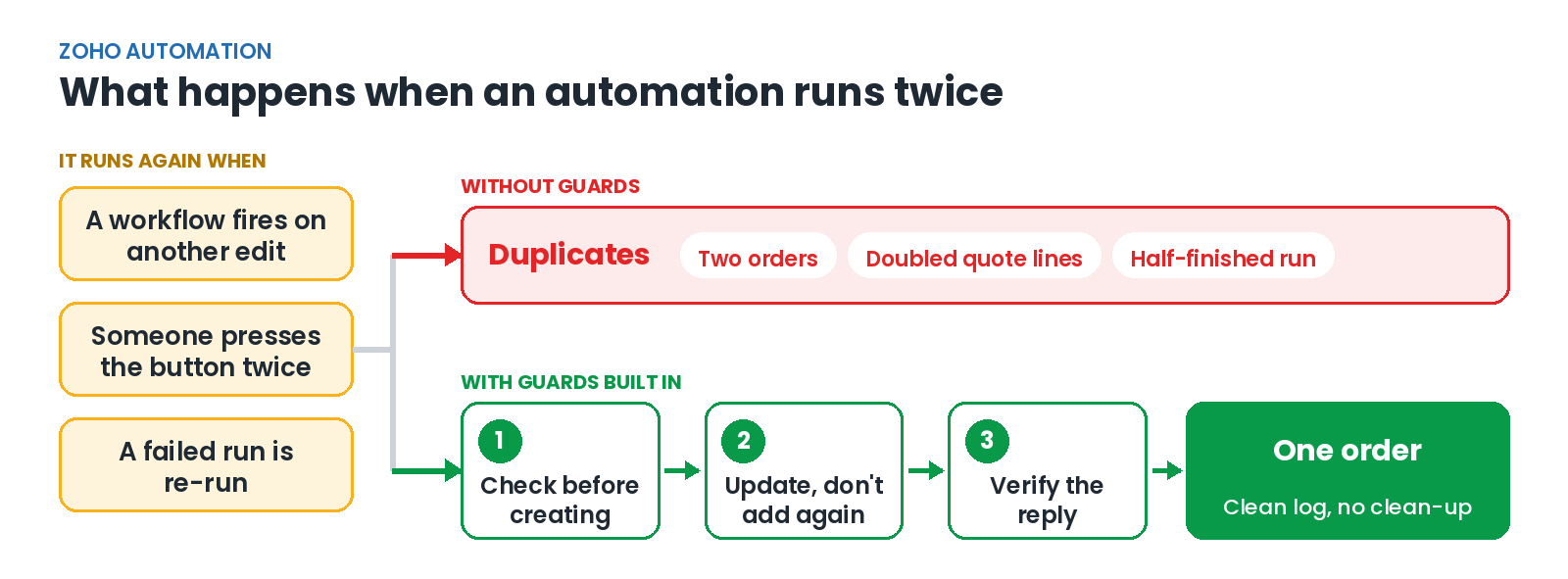
1. Look before you create
Before creating anything, check whether it already exists. In the equipment supplier's order process, the function first looks for a sales order ID stored on the deal. If there isn't one, it asks Zoho Books whether an order is already linked to that deal. It creates a new order only if both checks come back empty, and it writes the new ID back to the deal straight away.
The ID on the source record is what makes every later step safe. Without it, each run has to guess. The same check matters for billing: if you automate recurring invoicing, it's what stops a billing run raising the same month's invoice twice.
2. Amend drafts, version everything else
Reruns often happen because something changed, such as a partner revising a quote. The rule in the reseller's portal is simple: if the quote is still a draft, update it in place; if it has been sent or approved, create a new version and keep the earlier one intact.
When a function rebuilds a record's lines, it should replace the full set, not add to what's there. Adding is how a revised quote ends up with every line twice, which is exactly what showed up when we tested revising an approved quote.
3. Never move a record backwards
A rerun shouldn't move a deal from "Invoiced" back to "Order Placed" just because the function sets the stage it expects. I give later stages protection: the function can move a record forward, but never back. Documents that are already paid or fulfilled aren't rewritten automatically; they're flagged for someone to review. It's the same thinking as a paperwork gate before shipping: the system decides when a record may move on, not whichever run happens to arrive.
4. Let Zoho number its own documents
One rerun stopped when the function tried to create a shipping package with a number it had built itself. Zoho Inventory had auto-numbering switched on and rejected the number, because it didn't match the one Inventory would have generated. Worse, the earlier steps had already updated the sales order, so the run was left half-finished.
The fix is to leave the number out, let Zoho assign it, and store the ID it returns. Number your own references with care too. A job reference such as JOB-2026-0042 should follow on from the highest existing number, not from a count of records, because deleted records leave gaps and a count will eventually produce a duplicate.
5. Check what came back, not just that something came back
Zoho's APIs (the interfaces systems use to talk to each other) can return a "success" status code while the reply itself contains an error. They can also wrap the data in an extra layer. In the reseller's portal, a sync that didn't unwrap the reply couldn't find the rows that already existed, so it created them again.
Each step should read the reply, confirm the record is in the state it expects, and stop with a clear log entry if it can't confirm it. A run that stops cleanly is far easier to fix than one that carries on and creates duplicates.
6. Make test runs safe too
The equipment supplier's functions have a finance switch that is set to TEST by default. In TEST, the function writes a note describing the documents it would create, instead of creating them. Only the exact value LIVE allows real writes to Zoho Books and Zoho Inventory.
One lesson from that set-up: a CRM sandbox isn't automatically isolated. If Books is connected to your live CRM, a test run can still touch live finance data. Check where each connection points before you test.
When it isn't worth the effort
A welcome email or an internal notification doesn't need any of this. Anything that creates financial documents, moves stock or produces something a customer sees does. Building in these checks adds some time to a project. Untangling duplicate orders after go-live takes far longer, and usually lands on whoever does the month-end.
If you've ever found two invoices for one order, or a deal that jumped back a stage, book a free 30-minute introduction and we'll look at where your automations need these guards, or see how I approach workflow automation.